Hey there!
In this post, I’ll outline the key things an IT analyst needs to know in order to apply the BA technique known as use cases (UCs). It won’t be ultra-brief (that’s not realistic), but it’ll be much better than slogging through academic tomes on the subject — like this one, often considered foundational. You only need to grasp the core principles to start using the technique effectively.
One important note upfront: there are many views on use cases, and they often contradict each other. I’ll share the approach I personally find most useful after years of studying the topic, applying it in real projects, and teaching others to do the same. Let’s dive in.
In this post, I’ll outline the key things an IT analyst needs to know in order to apply the BA technique known as use cases (UCs). It won’t be ultra-brief (that’s not realistic), but it’ll be much better than slogging through academic tomes on the subject — like this one, often considered foundational. You only need to grasp the core principles to start using the technique effectively.
One important note upfront: there are many views on use cases, and they often contradict each other. I’ll share the approach I personally find most useful after years of studying the topic, applying it in real projects, and teaching others to do the same. Let’s dive in.
What are use cases anyway? Use cases are a BA technique. That is, they’re a tool or method an analyst can use to accomplish specific tasks. To be clear: a UC isn’t a task in itself. Don’t set “describe a set of use cases for the system” as an end goal. It’s a tool to help you achieve a well-defined objective — one that you should clearly understand and articulate in the context of your project and business analysis activities.
Now, focus on the words: “use case”. A use case is literally a way something is used. In BA terms, it’s how your system (i.e., the one you’re gathering requirements for) — or, more broadly, your solution, as per BABOK terminology — might be used by external entities (called actors). These actors could be people (end-users), or other systems (software/hardware), specifically in IT solutions.
Use cases answer the question: “What meaningful actions can X perform using our system?”
Spell check a document (MS Word).
Add a resource to bookmarks (web browser).
Create a new user (CRM).
Order a pizza (food delivery site).
So, a set of UCs (just a list) is basically the collection of all discrete, valuable interactions that actors can perform with the system.
Two simple rules for formulating use cases:
1. A use case is a single, complete interaction with the system. Came – did something – left. “Spell check a document,” for instance. From a user scenario perspective, this might look like: open Word → Open a document → Launch spell check → Get results → Close the document.
Bad examples (don’t write UCs like this): “Spelling,” “Spell-checking,” “User management,” “Company info”. None of these tells me what exact action a user can perform as a distinct operation.
Yes, there are exceptions — we’ll get to them later — but for now, treat this rule as a strict one.
2. A use case must deliver value to the actor. Let’s extend the above model: Approach the system → Perform UC → Gain satisfaction/value → Leave.
“Spell check” clearly provides value. I can imagine it as a complete scenario where something meaningful is achieved. But something like “Select spellcheck language” doesn’t stand on its own as valuable. Open doc → Select language → Close doc. So what? No value delivered. That’s just a step within a larger UC like “Spell check a document.”
“Spell check” clearly provides value. I can imagine it as a complete scenario where something meaningful is achieved. But something like “Select spellcheck language” doesn’t stand on its own as valuable. Open doc → Select language → Close doc. So what? No value delivered. That’s just a step within a larger UC like “Spell check a document.”
A Non-IT Example: The ATM. Classic interview favorite. You approach a standard ATM. What can you, the actor, do (keeping value and single-action rule in mind)? Withdraw cash. Check balance. Make a payment. Each is a standalone, valuable interaction — you walk away feeling satisfied. Now imagine the actor is not you, but a technician servicing the ATM. Their use cases might include: “Refill cash trays,” and whatever else those folks do (honestly, no idea).
What’s not a UC, but just a step in one? Enter PIN. Select language. Print receipt. Enter amount. These steps are individually meaningless but essential within a proper UC. Yes, sometimes we’ll promote such steps to full-blown UCs — but not at the stage where you’re simply trying to understand what value users get from your system.
Now that we know what UCs are — what are they for? What goals does a business analyst achieve by identifying use cases for the system they’re working on? Quick note: if you already use user stories heavily, chances are many of the purposes below are already covered in your process. Yes, UCs and user stories are different techniques — though they often overlap in practice. Comparing the two is beyond this post. So, what are the use cases of use cases?
1. Shift the perspective to the user’s side. Identifying UCs helps analysts (and stakeholders) view the solution from the user’s perspective: what value will they actually get from using it? This is absolutely critical when defining what the solution should include. Many analysts instinctively design systems based on features: “Dear client, what should our CRM include?” “Ticket management, stats, user access control, etc.” This is the feature perspective. It comes naturally, but it’s dangerous if used alone — it often lacks empathy for user needs. UCs force you to approach things differently: from the actor’s goal → to the system content.
Takeaway: If your projects lack this user-focused lens and you’re always asking “what should the system have?”, try building a UC list. You’ll likely uncover tons of missing, misdesigned, or even unnecessary functionality.
2. Define and manage scope clearly. Use cases are a great way to define and communicate the scope of your solution — and manage it later.
Caveat: Sometimes UCs aren't the best scoping unit. You may have a system with 10 features but only 2 UCs. That’s not always a good reflection of system content — especially for stakeholder communication. That’s why newer methods like Use Case 2.0 try to bridge the gap — but it hasn’t gained widespread traction. If this is a concern, consider switching to or supplementing with features or user stories.
Takeaway: If you don’t yet have a reliable scope-decomposition technique, try UCs. See how well they work across all roles on your project.
3. Link stakeholder goals to solution requirements. UCs are a solid way to tie stakeholder goals to the requirements of the solution (functional and non-functional). As we’ll see when we talk UC detailing, each UC can include a variety of requirements — meaning a UC is effectively a specification unit:
Takeaway: If you lack a structured approach to documenting requirements, start with a UC list + use case briefs + UC diagram (more on that below). This can serve as a base framework that you either stick with or build upon as needed.
So, how to start working on use cases?
Here’s a quick-start algorithm:
1. Identify all external agents (actors). A context diagram is a great place to start. Actors are those who directly interact with your solution (not indirect beneficiaries — those aren’t relevant for UCs). For now, focus only on actors who gain value from their interaction with the system.
2. Study actor needs. What value do they seek? What must they be able to do with the system to get that value?
3. Turn those into UCs using the rules above.
Sounds basic, right? But in practice, it’s more than just “sit and brainstorm.” If done properly, this bleeds into full-on requirements elicitation and analysis — a much broader discipline with its own techniques and deep rabbit holes.
What can supplement this algorithm?
Use cases can be mapped visually using UML Use Case Diagrams. On the one hand, these are just visual representations of your UC list — and visual aids can be incredibly effective. On the other, they let you show relationships between UCs and actors, adding valuable structure and clarity.
Here’s what a UC diagram for a super-simplified news portal might look like:
1. Shift the perspective to the user’s side. Identifying UCs helps analysts (and stakeholders) view the solution from the user’s perspective: what value will they actually get from using it? This is absolutely critical when defining what the solution should include. Many analysts instinctively design systems based on features: “Dear client, what should our CRM include?” “Ticket management, stats, user access control, etc.” This is the feature perspective. It comes naturally, but it’s dangerous if used alone — it often lacks empathy for user needs. UCs force you to approach things differently: from the actor’s goal → to the system content.
Takeaway: If your projects lack this user-focused lens and you’re always asking “what should the system have?”, try building a UC list. You’ll likely uncover tons of missing, misdesigned, or even unnecessary functionality.
2. Define and manage scope clearly. Use cases are a great way to define and communicate the scope of your solution — and manage it later.
- As an analyst, you can plan your work UC by UC. Identify UCs → Prioritize with stakeholders → Work on them iteratively. This ensures each step adds something valuable to the user’s experience. And for non-technical stakeholders, discussing use cases is usually way more intuitive than abstract features or fragmented requirements. Compare: “Let’s talk about ordering pizza” vs. “Let’s discuss the contents of the Cart page.”
- Your PM and devs can also plan releases around use cases: Release 1 — UC X. Release 2 — UC Y and Z. Each release delivers not just partial functionality, but a complete, user-centric interaction.
- Your testers will love you. UCs are a perfect base for test scenarios and cases. Testers execute an action → observe the result → compare it to expected behavior. And as you’ll see later, detailed UCs naturally support this step-by-step, scenario-based testing.
Caveat: Sometimes UCs aren't the best scoping unit. You may have a system with 10 features but only 2 UCs. That’s not always a good reflection of system content — especially for stakeholder communication. That’s why newer methods like Use Case 2.0 try to bridge the gap — but it hasn’t gained widespread traction. If this is a concern, consider switching to or supplementing with features or user stories.
Takeaway: If you don’t yet have a reliable scope-decomposition technique, try UCs. See how well they work across all roles on your project.
3. Link stakeholder goals to solution requirements. UCs are a solid way to tie stakeholder goals to the requirements of the solution (functional and non-functional). As we’ll see when we talk UC detailing, each UC can include a variety of requirements — meaning a UC is effectively a specification unit:
- It shows what actors can achieve using the system.
- It outlines what functionality is needed to support those outcomes.
Takeaway: If you lack a structured approach to documenting requirements, start with a UC list + use case briefs + UC diagram (more on that below). This can serve as a base framework that you either stick with or build upon as needed.
So, how to start working on use cases?
Here’s a quick-start algorithm:
1. Identify all external agents (actors). A context diagram is a great place to start. Actors are those who directly interact with your solution (not indirect beneficiaries — those aren’t relevant for UCs). For now, focus only on actors who gain value from their interaction with the system.
2. Study actor needs. What value do they seek? What must they be able to do with the system to get that value?
3. Turn those into UCs using the rules above.
Sounds basic, right? But in practice, it’s more than just “sit and brainstorm.” If done properly, this bleeds into full-on requirements elicitation and analysis — a much broader discipline with its own techniques and deep rabbit holes.
What can supplement this algorithm?
Use cases can be mapped visually using UML Use Case Diagrams. On the one hand, these are just visual representations of your UC list — and visual aids can be incredibly effective. On the other, they let you show relationships between UCs and actors, adding valuable structure and clarity.
Here’s what a UC diagram for a super-simplified news portal might look like:
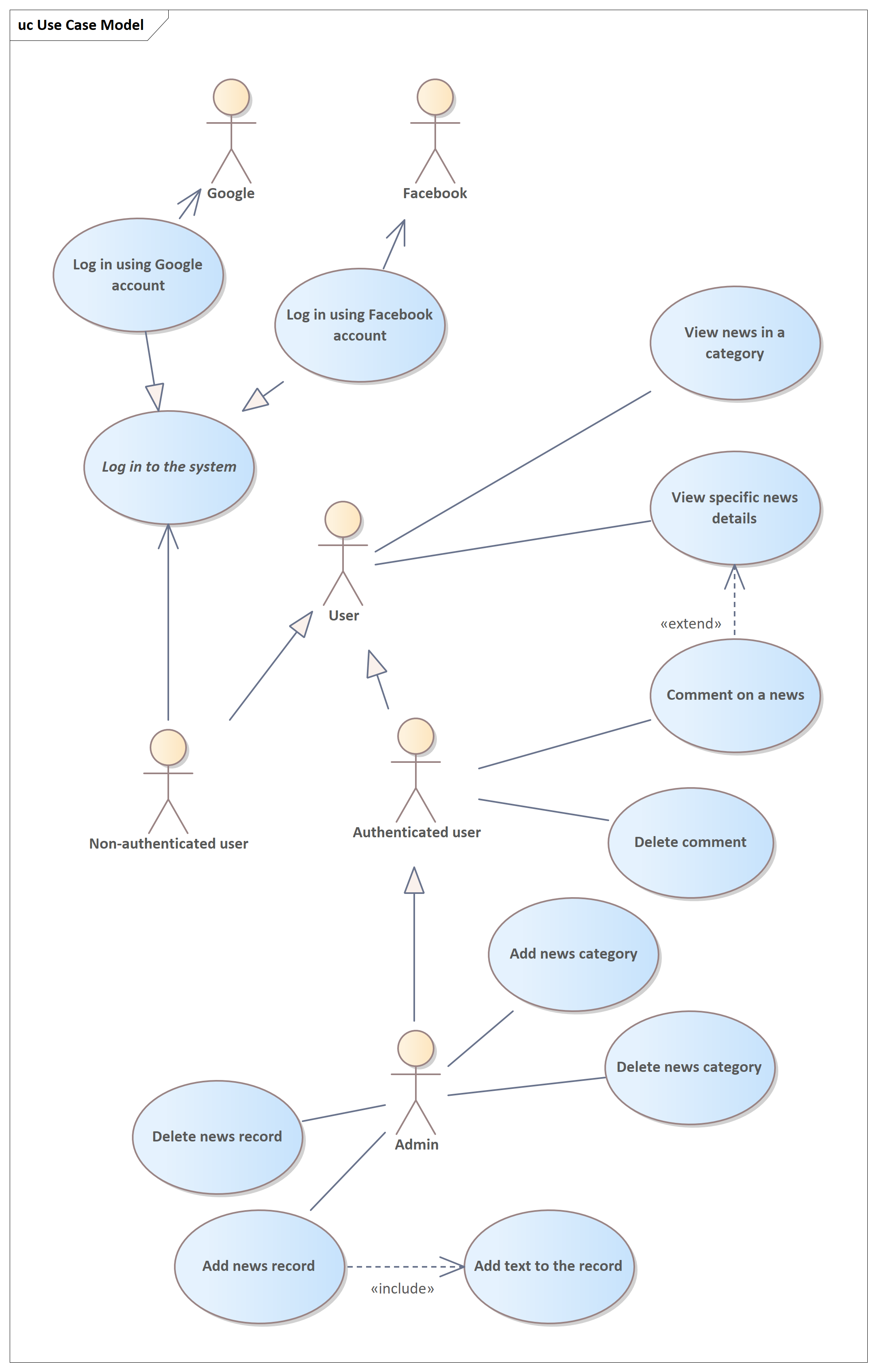
The diagram is deliberately complicated to show as many UML features as possible, so don’t judge it as a tool for simplifying communication.
Let’s analyze the diagram:
Now in more detail:
The key actor of the portal is User. This means any user of the system. They can be either authenticated (logged in with a username/password) or not. This is represented by a generalization/inheritance relationship — a link between two elements that shows the child is a more specific version of the parent. In other words, the child is the same as the parent but with specifics. An Authenticated User is a User, but with the added detail that this person has logged in. Similarly, an Authenticated User can have Admin rights (or not, being a regular user), shown by another inheritance.
User can perform the use case “View news in a category”, shown by an association between the actor and the use case. Since in inheritance the child inherits all properties of the parent (and usually adds something of its own), all User descendants (Authenticated User, Non-authenticated User, Admin) can perform this use case as well. This makes sense because everyone can view news, regardless of their system status. Why did we add inheritance between actors? For example, a) to associate common use cases with the parent actor to avoid duplicating associations and cluttering the diagram, b) to show a hierarchical structure of actors if we want that on the diagram.
It’s rarer, but still used, to have inheritance between use cases. If two use cases are connected by generalization, it means the child is essentially the same as the parent but with specifics. For example, “Log in to the system” can represent two different useful actions: logging in via Facebook or Google accounts. “Log in to the system” is italicized because it is abstract (or, simply put, it should not be executed on its own) — only its children are performed; there is no actual execution of the abstract login itself, only via one of the two options.
Now let’s look at the use case “Log in to the system”. A curious analyst might protest: how can this be a useful use case on its own? What’s the point of going into the system just to log in? Yes, that violates one of the key rules. But a bad specialist blindly follows rules just for the sake of rules — sometimes it’s worth breaking them for a good purpose. What did we achieve by doing this here? First, we made the scope fuller and clearer (without login, nobody would know that the system has login functionality). Second, we showed that login can be done in two ways by highlighting this “incorrect” use case. Third, we showed that an unauthenticated user also has specific actions — they are not just there for decoration on the diagram.
Let’s analyze the diagram:
- It’s easy to guess that the ovals are use cases, and the stick figures are actors (remember that actors can represent not only human users but also external interfaces to the IT solution — software or hardware systems).
- The arrows are relationships showing which actors can perform which use cases, who is a secondary participant, plus how some use cases or actors are connected to each other.
- You can also show system boundaries using a rectangle (the boundary element in UML), but in most cases, this is redundant.
Now in more detail:
The key actor of the portal is User. This means any user of the system. They can be either authenticated (logged in with a username/password) or not. This is represented by a generalization/inheritance relationship — a link between two elements that shows the child is a more specific version of the parent. In other words, the child is the same as the parent but with specifics. An Authenticated User is a User, but with the added detail that this person has logged in. Similarly, an Authenticated User can have Admin rights (or not, being a regular user), shown by another inheritance.
User can perform the use case “View news in a category”, shown by an association between the actor and the use case. Since in inheritance the child inherits all properties of the parent (and usually adds something of its own), all User descendants (Authenticated User, Non-authenticated User, Admin) can perform this use case as well. This makes sense because everyone can view news, regardless of their system status. Why did we add inheritance between actors? For example, a) to associate common use cases with the parent actor to avoid duplicating associations and cluttering the diagram, b) to show a hierarchical structure of actors if we want that on the diagram.
It’s rarer, but still used, to have inheritance between use cases. If two use cases are connected by generalization, it means the child is essentially the same as the parent but with specifics. For example, “Log in to the system” can represent two different useful actions: logging in via Facebook or Google accounts. “Log in to the system” is italicized because it is abstract (or, simply put, it should not be executed on its own) — only its children are performed; there is no actual execution of the abstract login itself, only via one of the two options.
Now let’s look at the use case “Log in to the system”. A curious analyst might protest: how can this be a useful use case on its own? What’s the point of going into the system just to log in? Yes, that violates one of the key rules. But a bad specialist blindly follows rules just for the sake of rules — sometimes it’s worth breaking them for a good purpose. What did we achieve by doing this here? First, we made the scope fuller and clearer (without login, nobody would know that the system has login functionality). Second, we showed that login can be done in two ways by highlighting this “incorrect” use case. Third, we showed that an unauthenticated user also has specific actions — they are not just there for decoration on the diagram.
Now about why some associations have directions (arrows) and some do not. Actors in use cases can be primary or secondary. A primary actor is the one who gains key benefits from the use case (and usually initiates it, but not always); the primary actor must be shown for each use case. A secondary actor participates in the use case in another way and may not always exist. For example, for an ATM system’s use cases like “Withdraw Cash” or “View Card Balance,” the primary actor is the ATM User. The secondary actor could be a processing center — an external entity involved at a certain step of the use case: the ATM sends a request to the processing center to adjust the user’s account balance or to retrieve the balance amount (the ATM itself can’t know how much money is on the account). In our news portal, for the login use case via different options, the secondary actors are the external software systems (APIs) that authenticate the user.
Visually, if your diagram has no secondary actors, associations can be undirected (no arrowheads). If there are secondary actors, to understand who is primary and who is secondary in relation to each use case, arrows must be drawn. Arrows don’t show data flow directions or anything like that — simply, the link goes from the primary actor to the use case, and from the use case to the secondary actor.
Finally, let me explain two types of relationships that show additional connections between use cases — extend and include. These relationships are similar and share properties. First, both tend to complicate diagrams by adding extra meaning, so many recommend avoiding them to keep diagrams simple. Second, different people interpret these links differently. The notation’s creators themselves admit these relationships are ambiguous and advise using them cautiously (ambiguous elements may cause readers to misunderstand the model, defeating the purpose). Third, when using these links, the included or extending elements don’t have to be independently useful use cases. We will see examples soon.
What is include? It’s a relationship between use cases showing that from the perspective of scenarios and other parameters, one use case fully includes another. For example, if as an Admin I add news to the site, I must enter the text of the news. The arrow goes in the direction reading the relationship name. Include lets you model a process and its subprocesses. The included use case (“Add text to the record”) may not be useful on its own — not every use case can be broken down into smaller independently useful ones (ones that can be executed outside the parent).
What is extend? Extend is a relationship showing that one use case can extend another by adding behavior — that is, it may (not must, like with include) act as an addition to the extended use case. The arrow also reads in the direction of the label, but unlike include, if B extends A, it means that during A (“View specific news details”), under certain conditions or by choice, the actor may also perform B (“Comment on news”). B may not be useful on its own — it’s only an optional extension to A. You can’t comment on news without viewing it first. Notice that the emphasis in use cases is on system operations (opening and displaying the news), not just user actions that we can’t control (like just “looking” at news).
In summary, both relationships are useful to show that “during use case X the actor must perform subprocess Y” or “during X the actor may optionally perform Y.” But don’t overuse them — we’ve already mentioned their pitfalls. Still, highlighting key moments like these can be valuable.
Visually, if your diagram has no secondary actors, associations can be undirected (no arrowheads). If there are secondary actors, to understand who is primary and who is secondary in relation to each use case, arrows must be drawn. Arrows don’t show data flow directions or anything like that — simply, the link goes from the primary actor to the use case, and from the use case to the secondary actor.
Finally, let me explain two types of relationships that show additional connections between use cases — extend and include. These relationships are similar and share properties. First, both tend to complicate diagrams by adding extra meaning, so many recommend avoiding them to keep diagrams simple. Second, different people interpret these links differently. The notation’s creators themselves admit these relationships are ambiguous and advise using them cautiously (ambiguous elements may cause readers to misunderstand the model, defeating the purpose). Third, when using these links, the included or extending elements don’t have to be independently useful use cases. We will see examples soon.
What is include? It’s a relationship between use cases showing that from the perspective of scenarios and other parameters, one use case fully includes another. For example, if as an Admin I add news to the site, I must enter the text of the news. The arrow goes in the direction reading the relationship name. Include lets you model a process and its subprocesses. The included use case (“Add text to the record”) may not be useful on its own — not every use case can be broken down into smaller independently useful ones (ones that can be executed outside the parent).
What is extend? Extend is a relationship showing that one use case can extend another by adding behavior — that is, it may (not must, like with include) act as an addition to the extended use case. The arrow also reads in the direction of the label, but unlike include, if B extends A, it means that during A (“View specific news details”), under certain conditions or by choice, the actor may also perform B (“Comment on news”). B may not be useful on its own — it’s only an optional extension to A. You can’t comment on news without viewing it first. Notice that the emphasis in use cases is on system operations (opening and displaying the news), not just user actions that we can’t control (like just “looking” at news).
In summary, both relationships are useful to show that “during use case X the actor must perform subprocess Y” or “during X the actor may optionally perform Y.” But don’t overuse them — we’ve already mentioned their pitfalls. Still, highlighting key moments like these can be valuable.
In the end, by identifying a set of use cases for the system and visualizing them in a diagram, we’ve solved the first two business analyst tasks mentioned at the start: stepping into the user’s shoes to think about what useful things they can do with the solution, and decomposing the solution’s scope into manageable pieces. Now let’s talk about solving the third task — elaborating and linking system requirements in the context of use cases — stay tuned.
